بسم الله
Having finished memory management in the previous lesson, this lesson concludes the series: the File-System Interface.
File system implementation is a major aspect of operating system architecture: designers must decide how to map file-system information onto physical storage devices, and what methods to provide for accessing and manipulating it. File systems are often performance bottlenecks — making them adequately efficient is quite a challenge.
A file system consists of two parts: a collection of files, and a directory structure whose purpose is providing information about, and organization of, those files.
The File Concept
A file is a logical unit of storage — the smallest allotment of logical secondary storage — a named collection of related information recorded on secondary storage.
File Attributes
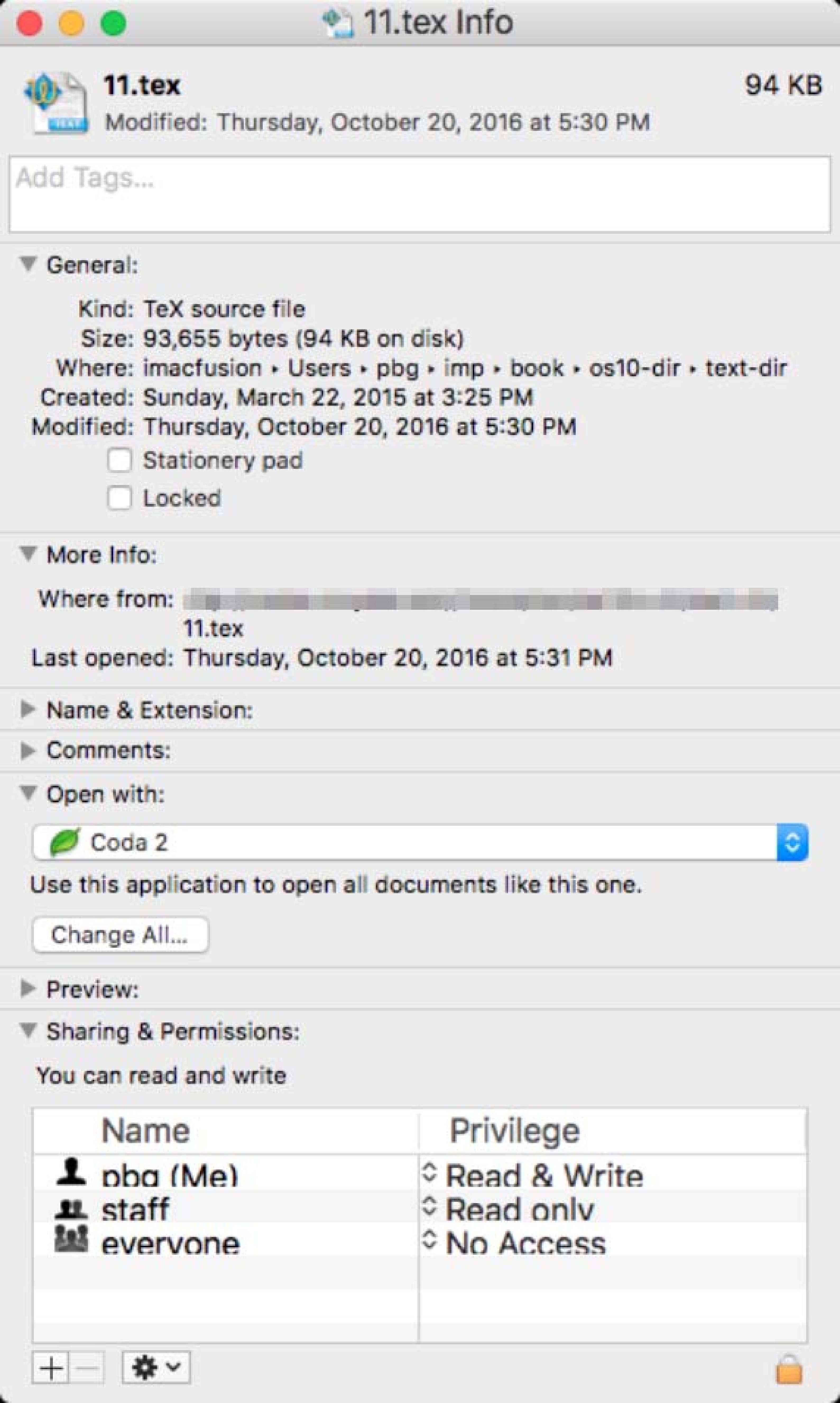 Figure (1): A file’s info window
Typical file attributes include:
- Name: human readable.
- Identifier: a unique ID number.
- Type: information needed for OS support of the file type.
- Location: a pointer to the file’s location on a device.
- Size: in bytes, words, or blocks.
- Protection: who or what may read, write, execute, and so on.
- Timestamps & User ID: creation, last modification, last use, and owner.
Other attributes are possible too, like character encoding for text files or a checksum. The OS stores these attributes in the file system’s directory structure.
File Operations
Files are abstract data structures with associated operations implemented via system calls:
- Create a file (allocate space and add a directory entry).
- Open a file (cache its information in main memory and return a pointer).
- Write / Read (possibly updating the current-position pointer).
- Reposition within a file (change the file pointer’s value).
- Delete a file (remove its directory entry and deallocate space).
- Truncate a file (release space and reset size to zero).
This is a minimal set; other operations can be composed from them — copying a file, for instance, means creating a new one then reading from the old and writing to the new.
Many systems require opening files before use: the open operation places directory information about the file into an open-file table structure in primary memory, letting processes access the file many times without fetching directory info from disk each time. In systems allowing multiple processes to hold the same file open simultaneously, two levels of tables are customary: a single system-wide table plus per-process tables — each holding what pertains to that process’s use, such as current read/write positions, with each per-process entry pointing at the file’s entry in the system-wide table, which keeps process-independent facts: on-disk location, access dates, size, and open count.
So the information associated with an open file:
- File Pointer: the process’s last read/write location.
- File-Open Count: how many processes have it open.
- Location: where on disk to read/write.
- Access Rights: the mode of use granted to this process.
File-locking operations may also be available: shared and/or exclusive locks, mandatory and/or advisory.
File Types & Internal Structure
There are various file types — text, binary, executable — often indicated by filename extensions. Yet most types receive no full OS support: it is common for the OS to treat files simply as an unstructured sequence of bytes:
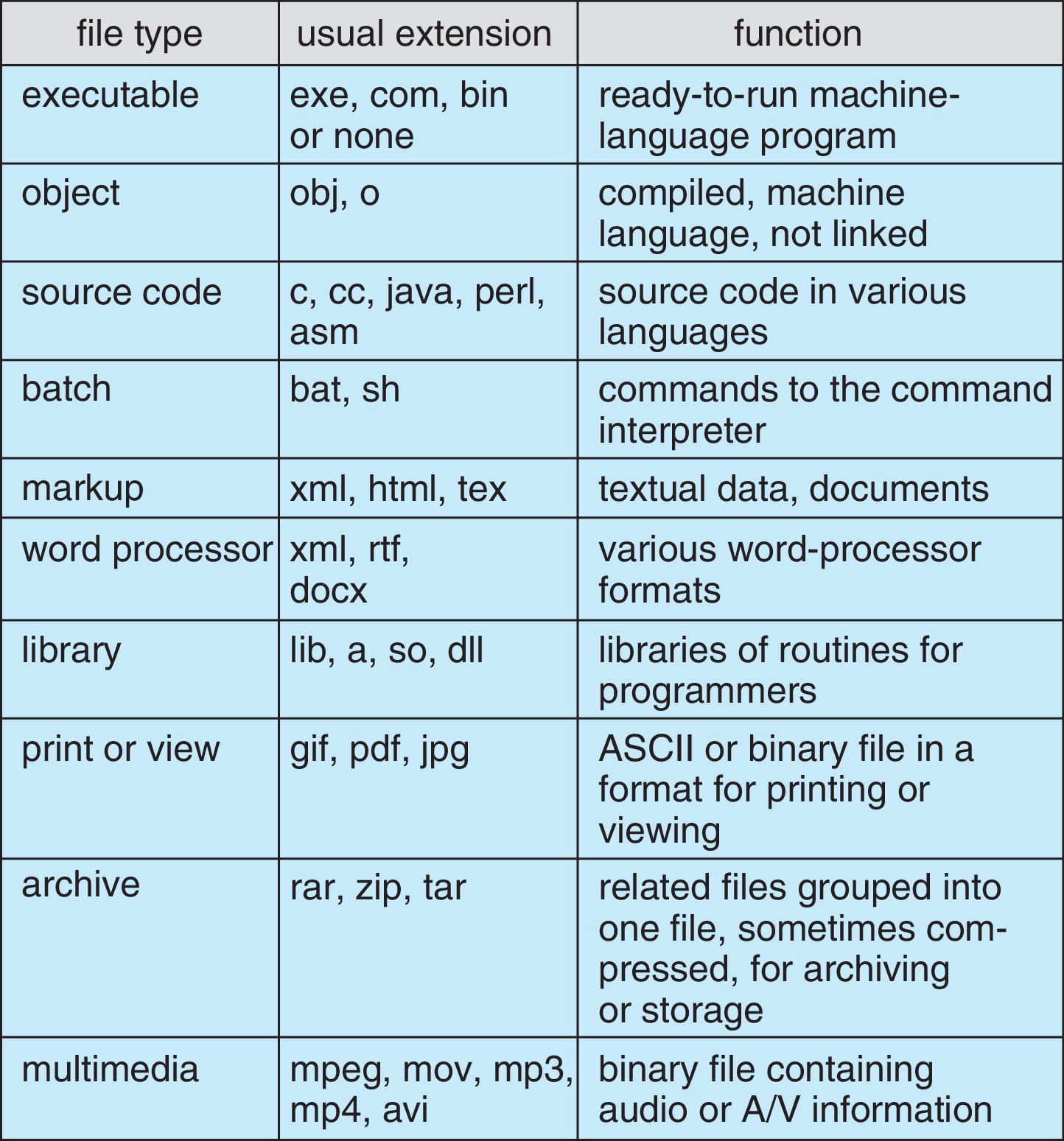 Figure (2): Common extensions and their systems
Every OS must fully support at least one executable file type so it can load and run programs.
Internally, all basic I/O functions work block by block — physical blocks normally being the 512-byte data sections of disk sectors. Files are sequences of logical records that must be mapped onto file blocks — the application or the OS may do that mapping. Since all files are allocated whole numbers of physical blocks, every file system suffers from internal fragmentation.
Access Methods
Information in files can be accessed in different ways:
Sequential Access
The simplest and most common method: the file reads as a sequence from start to end, the way a tape would; writing likewise appends new items to the end. Typical operations are “read next” and “write next”; the OS maintains a pointer to the current position and may support repositioning it (seek):
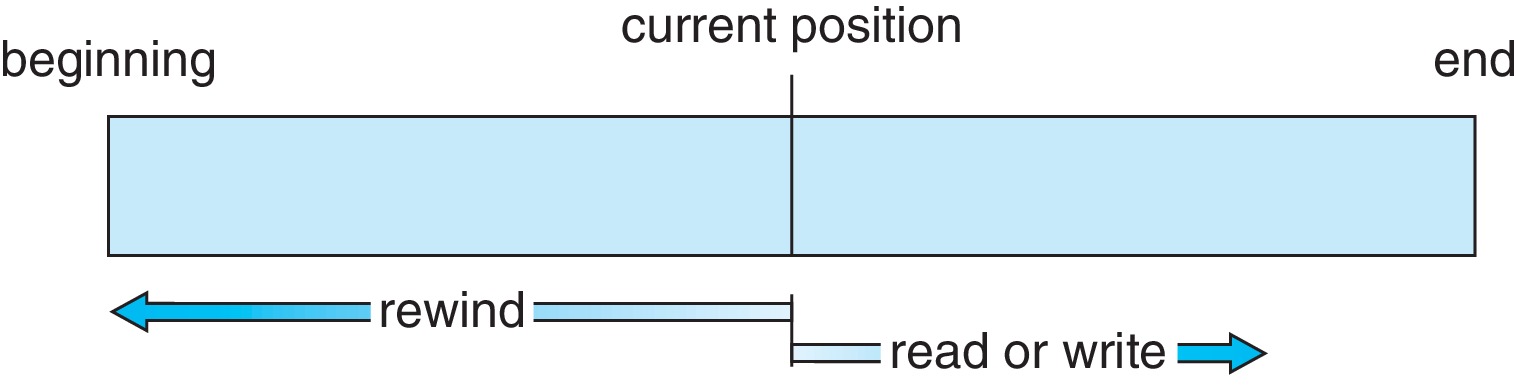 Figure (3): Reading the file as a sequence
Direct Access
Allows reaching blocks in arbitrary order — treating the file as an array of blocks. Typical operations are “read block #n” and “write block #m”, with block numbers being logical addresses starting from zero:
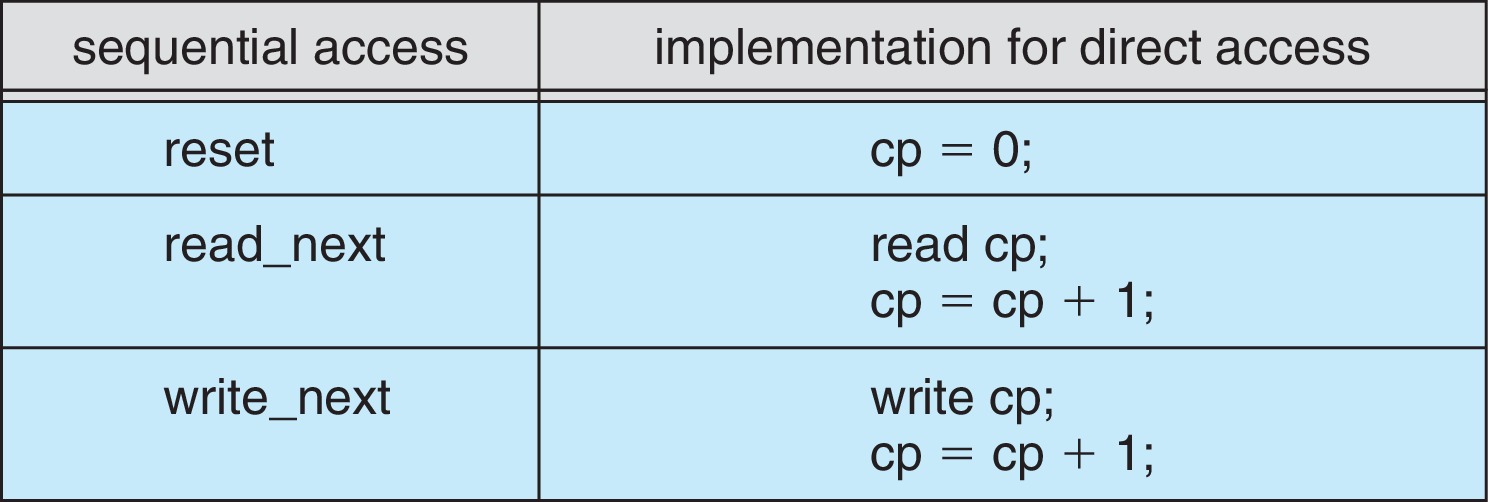 Figure (4): Simulating sequential access on a direct-access file
Suppose the first byte is numbered 0, the file is a sequence of L-byte records numbered from 0, and we want record N: compute the starting byte N×L and fetch the L bytes beginning there.
Other Methods
Other methods build on direct access, often using an index to look up file block numbers before going direct:
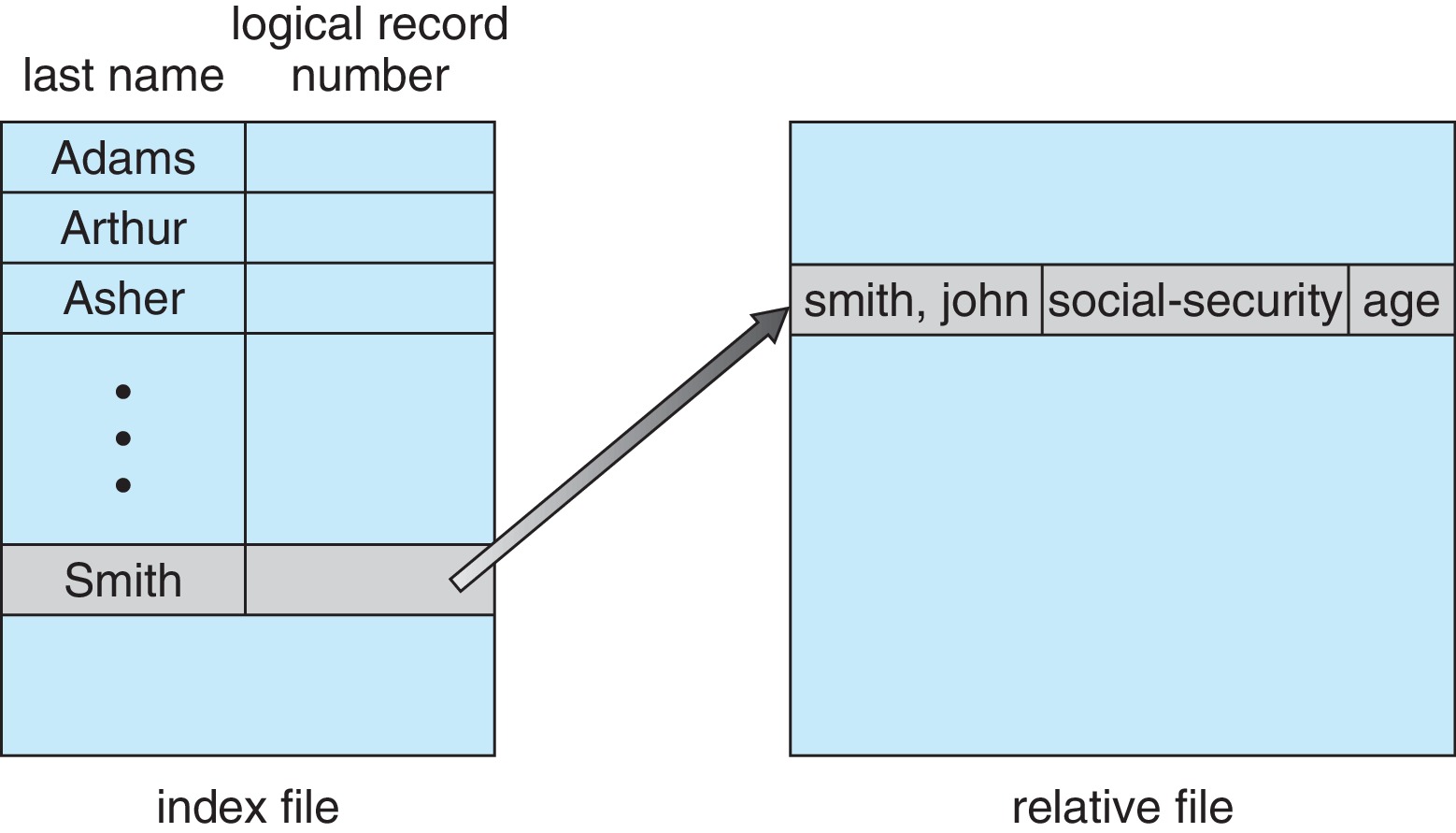 Figure (5): An index file and relative files
Directory Structure
A directory is basically a lookup table for file information, keyed by filename. Directory structures must support: searching for a file by name, creating a file (adding to the directory), deleting a file, listing a directory’s contents, renaming a file, and traversing the file system (touching all directories and files — during backup, say).
Single-Level Directory
Here the directory works like a single list of entries; even with multiple users, no two files may share a name:
 Figure (6): One list for everyone
Two-Level Directory
A master file directory with multiple sub-directories; each user gets their own home directory and can name files freely without colliding with other users’ names. Specifying a user name plus a filename within that user’s directory uniquely identifies the file via this pathname. A filename without a user name refers to the user’s own directory or a special system-files directory. The chain of directories searched when naming a file is called the search path:
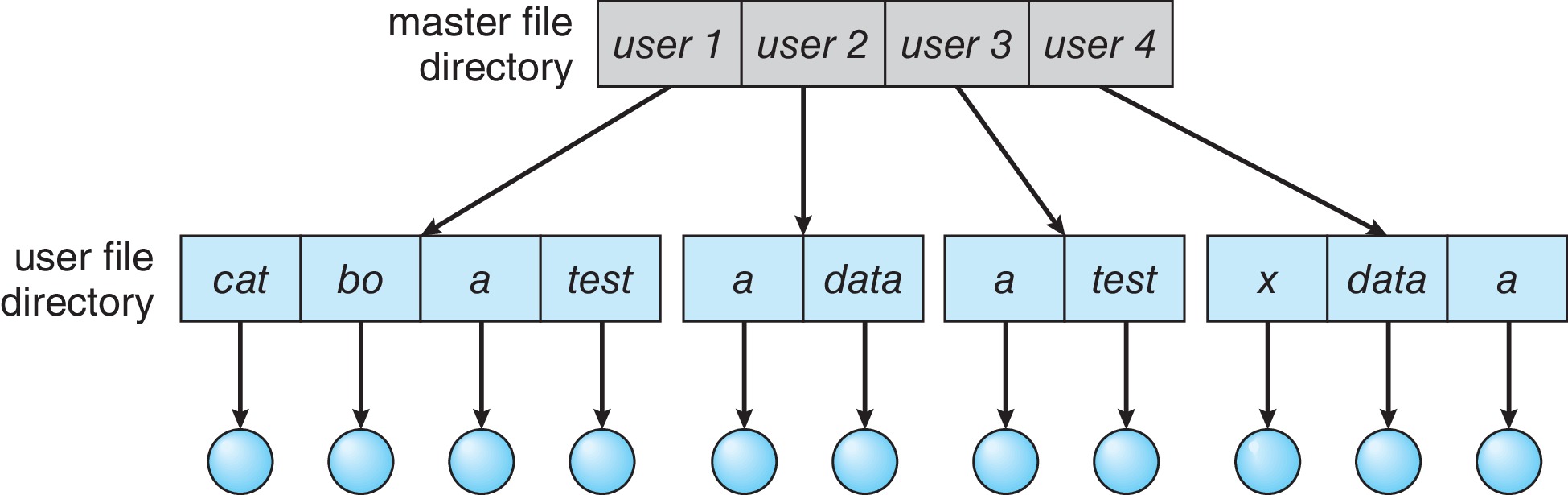 Figure (7): A master directory and per-user directories
Tree-Structured Directories
A generalization of the two-level scheme letting users create their own tree of subdirectories to group and organize files. The tree has a root, and every file or directory has a unique pathname starting from it. Processes move around the tree via a system call designating their current working directory; a user’s accounting file — passwd, say — typically sets which directory becomes the initial working directory at login. Pathnames are either absolute or relative:
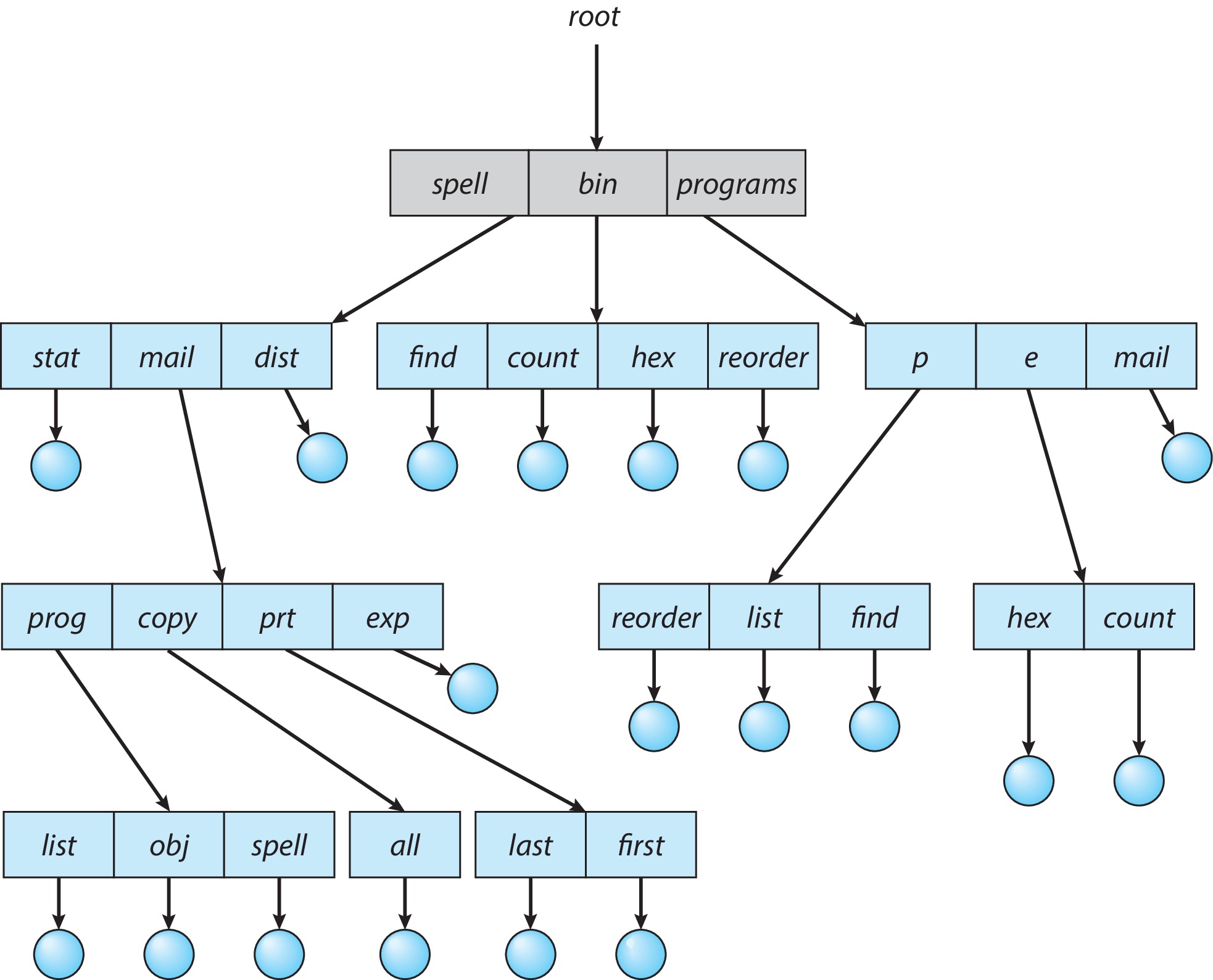 Figure (8): The tree of directories and files
Acyclic-Graph Directories
This structure lets directories share a file or subdirectory — impossible in a tree by definition. Sharing is implemented through links:
A symbolic link (soft link) may be thought of as a file containing a path name; its directory entry carries a special bit marking it as a link rather than an ordinary file. If /x/y is a file we wish to share, we can place a symbolic link in /z containing the pathname /x/y and name it r; then every reference to /z/r reaches the same file as /x/y.
The original directory entry for /x/y is sometimes called a hard link — just an ordinary entry consisting of the filename and the on-disk address of the file’s directory information. Another way to share: create another hard link — an entry in /z named r carrying the same on-disk address as the original. We now have two separate directory entries pointing to the same file on disk.
With multiple hard and/or soft links around, designers must be careful implementing deletion operations: pointers can be left dangling, and/or file space might be deallocated while still in use:
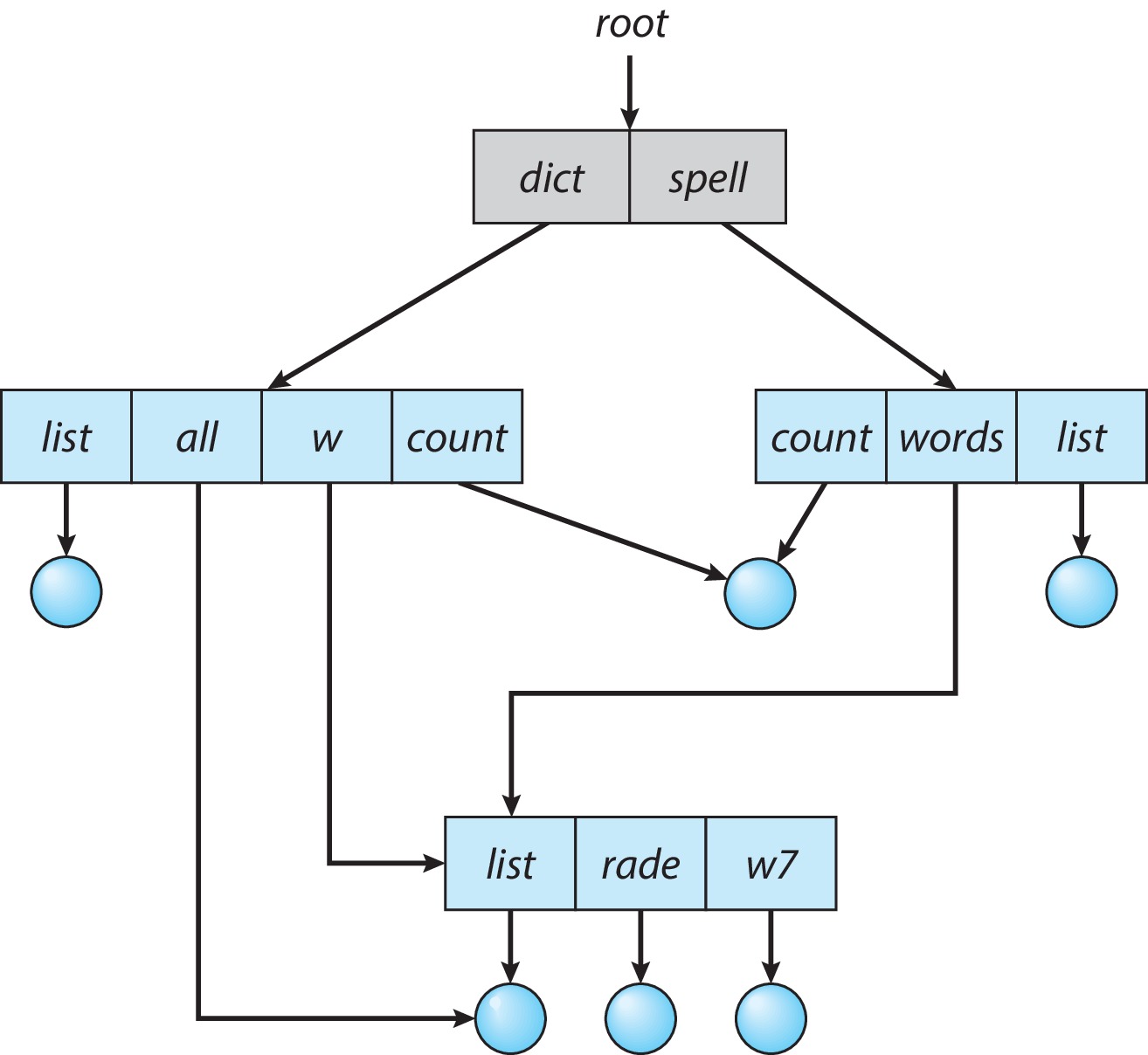 Figure (9): Sharing files across directories
General Graph Directory
Here cycles of directories are allowed to exist. When cycles become possible, designing algorithms that search and traverse correctly gets harder, and finding and deallocating directories no longer connected to the main part of the file system gets harder too:
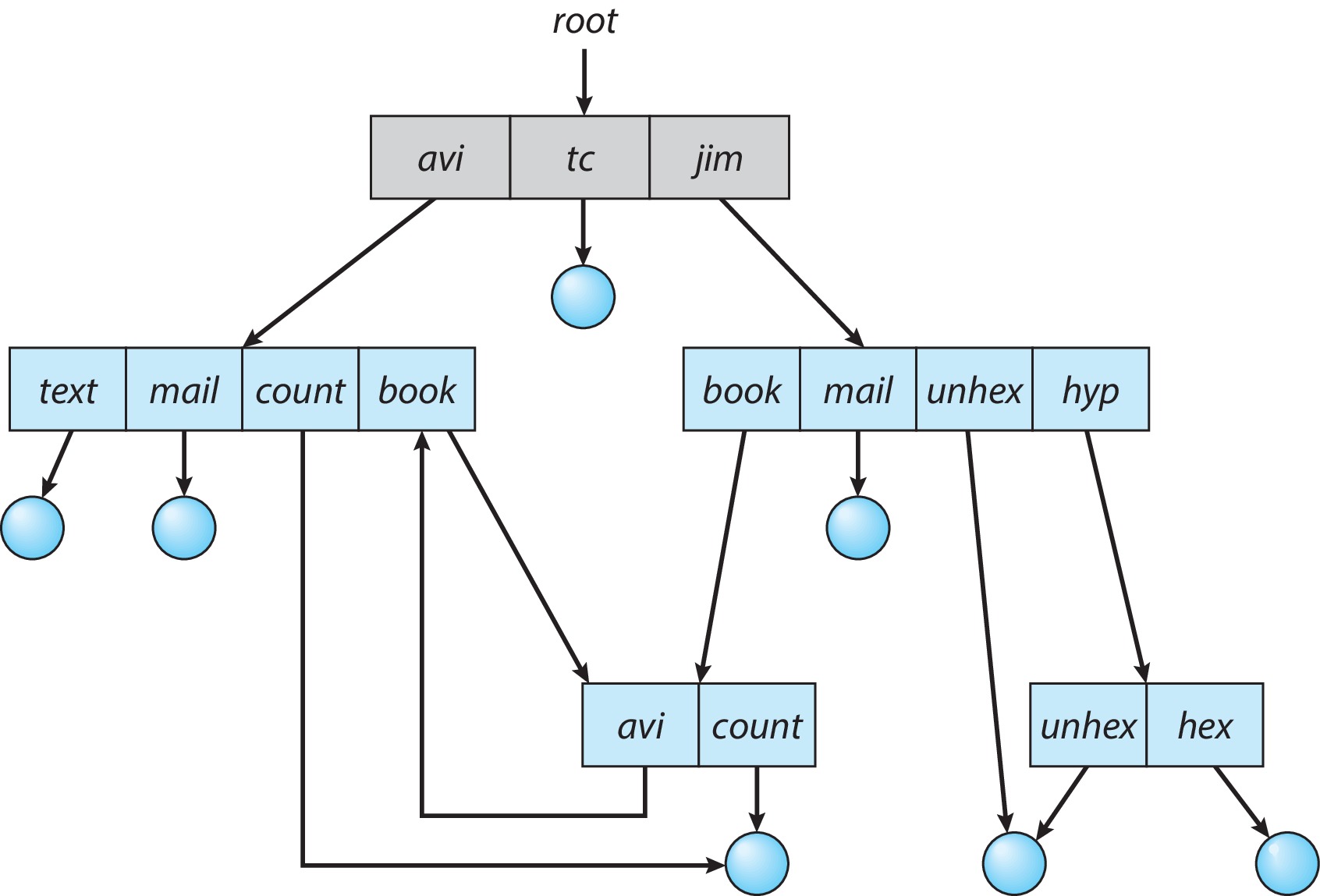 Figure (10): A cycle in the directory structure
Protection
When valuable information lives on a computer system, we want it safe from physical damage and improper access.
Types of Access
We must provide access to files, but controlled access. Examples of operations needing control: Read, Write, Execute, Append, Delete, List, and Attribute Change.
Access Control
One approach: keep an access control list (ACL) with each file or directory — a table keyed by user ID giving any user’s specific rights on that object. Full ACLs are difficult to implement.
Hence many systems use a condensed form storing rights for only three parties:
- Owner: the user who created the file.
- Group: a designated work group.
- Other: everyone else on the system.
Read, write, and execute bits commonly attach to each of the three classes. For a plain file, a set read bit lets class members read it; write lets them write; execute lets them run it (presumably a program or script). For directories: read grants listing contents, write allows creating new files within (and deleting the directory if empty), execute grants cd-ing into the directory and accessing its objects subject to those objects’ own permissions. Users lacking either write or execute permission on a directory cannot delete objects inside it:
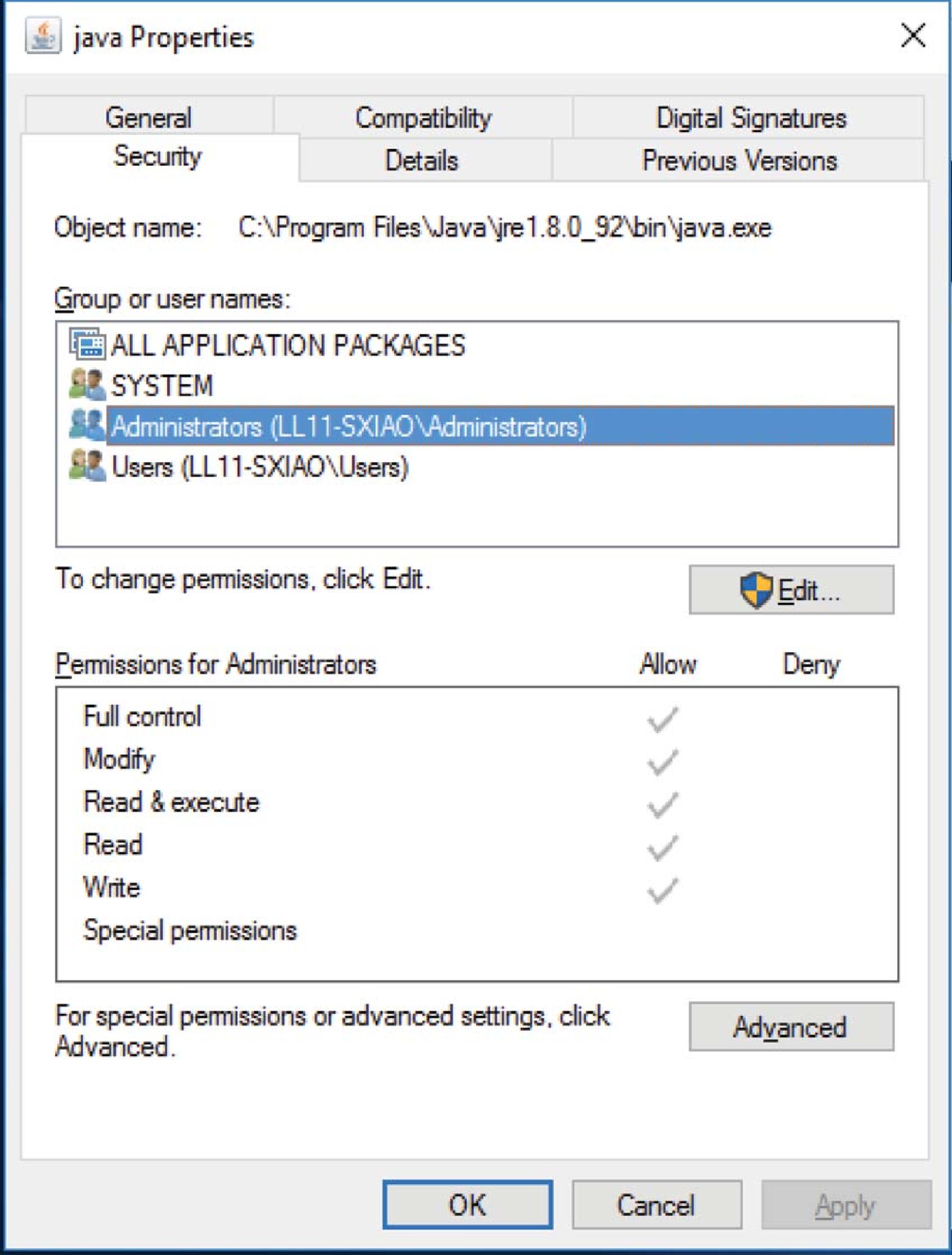 Figure (11): Managing ACLs on Windows
Some systems, Solaris for instance, default to the (owner, group, others) approach while allowing finer-grained controls on specific file objects — file object meaning files, directories, and other special items.
Other Protection Approaches
Another approach assigns a password to a file or directory — though managing multiple passwords across multiple objects gets complicated.
Memory-Mapped Files
File I/O sometimes requires multiple time-consuming syscalls and disk accesses; designers improve efficiency with virtual-memory techniques:
The system handles initial accesses to file blocks much like page faults; after loading file blocks into physical frames, the process touches them with ordinary memory accesses. Modified blocks get copied through to disk when the process closes the file, or perhaps as part of a periodic interrupt routine.
Where available, file memory-mapping can also implement sharing a file among a group of processes, shared memory, and copy-on-write functionality:
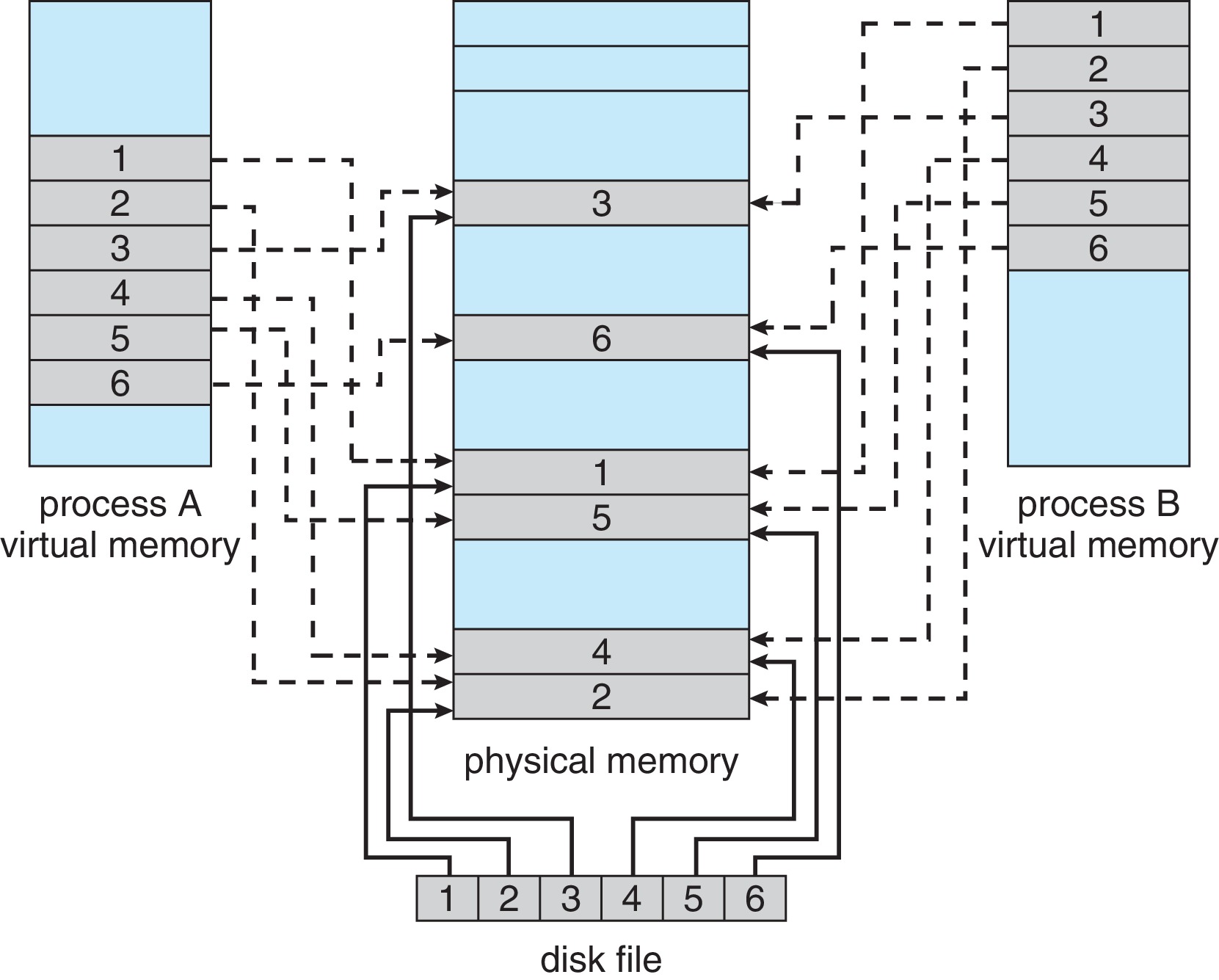 Figure (12): One file mapped into two processes’ spaces
And so we reach the end of the OS concepts series: we started with the machine’s structure, the kernel, and user space; passed through interrupts, processes and threads, scheduling, and memory management; and finish at the file-system interface every user touches daily. May God make this work beneficial.
Keep us in your prayers.