بسم الله
This article is dedicated to Processes & Threads, which exist in every operating system.
Processes
Briefly, a process is a program in execution.
A process has a structure inside the kernel called KProcess, or the Process Control Block (PCB), which the kernel uses to control this process’s operations.
The PCB contains many fields; the most important:
- Process State: the state of the process.
- Process Number: the process’s number.
- Program Counter: the program counter.
- Registers: the registers belonging to the process.
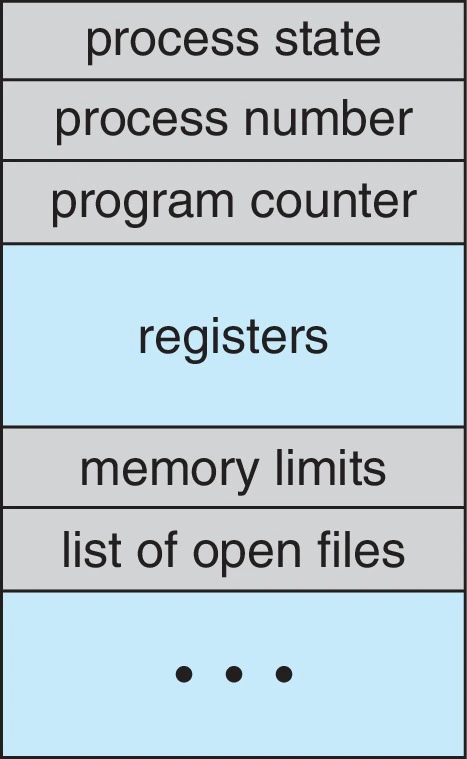 Figure (1): The process control block
At the Memory Level: EProcess
At the memory level things differ: processes have a different structure called EProcess, entirely distinct from the KProcess.
The EProcess also contains many fields; the most important:
- KProcess Structure.
- Process ID.
- EXE File Name.
The EProcesses live in memory linked as a doubly-linked list — each process carries a forward link (Flink) to the next element and a backward link (Blink) to the previous one:
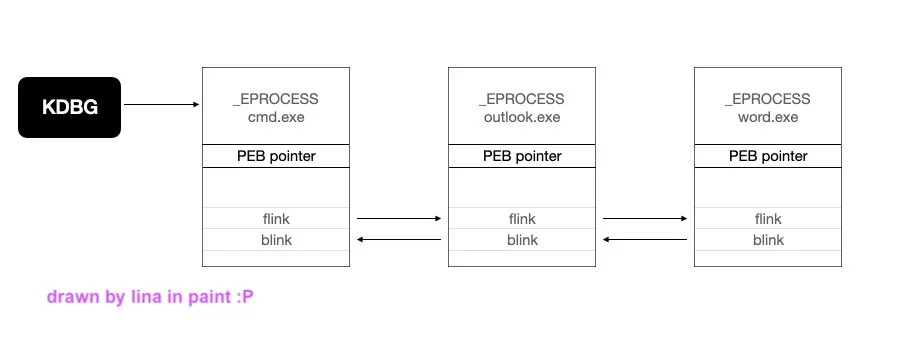 Figure (2): Processes chained in memory
Plenty of tools reach these EProcesses, such as Process Explorer, which you can download straight from Microsoft.
Threads vs Processes
- A thread is what the OS executes.
- A process is the container for that execution.
The process is not what runs the code; it must contain at least one thread to run that code on the CPU (but a thread cannot run alone outside its process’s umbrella).
A thread has three basic states:
- Running: the thread is currently executing on the processor.
- Ready: waiting for the processor to become free so it can run.
- Blocked/Suspended: stopped awaiting some event; once it completes, the scheduler resumes its execution.
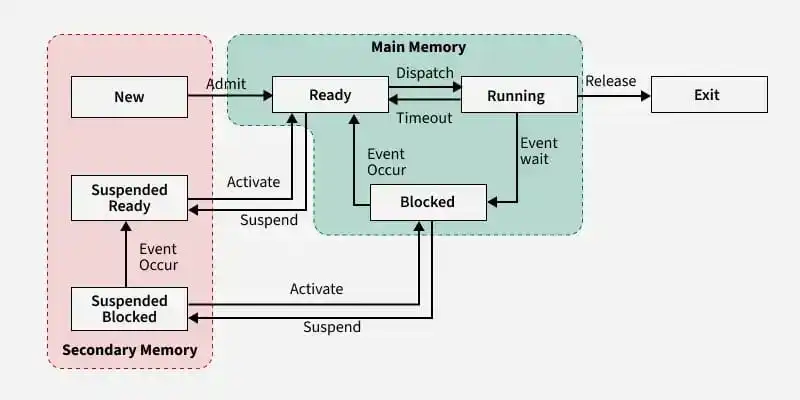 Figure (3): Thread states
We conclude from all this that a single process can contain one or more threads.
Now — since a process may contain multiple threads, are those threads isolated from each other?
No; these threads share memory — meaning they share the address space, which is simply the memory sections like .data section and .code section. But each thread keeps its own stack and registers.
Virtual Address Space
What is the virtual address space? Any exe file we run gets its own process, and that process has its own address space.
On a 32-bit system the address space spans from 00000000 to FFFFFFFF.
This range splits into two halves of 2GB each: one for user mode and one for kernel mode:
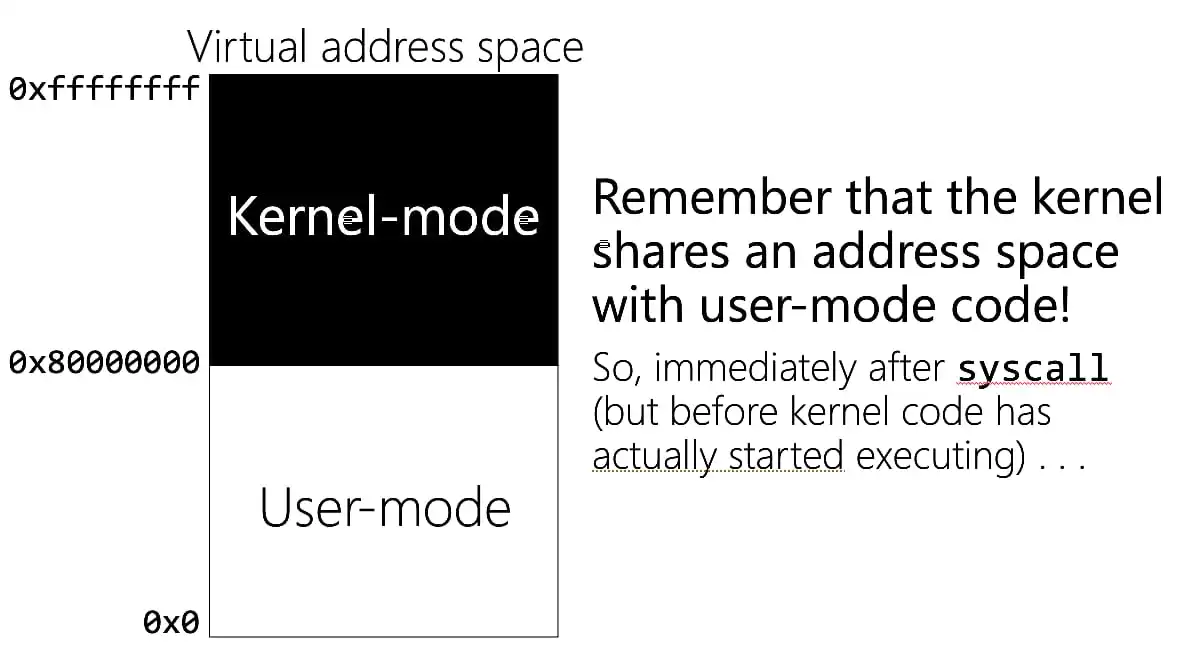 Figure (4): The 4GB split between user and kernel modes
Virtual Address vs Physical Address
Let us take an example: we have two different programs:
- MyApp1
- MyApp2
Each program has a process, each process has virtual memory starting at 0x00000000 and ending at 0x80000000, and both programs have their sections in memory.
When MyApp1 runs, it places .text and .data at certain addresses in memory, and MyApp2 does the same. By coincidence, MyApp1’s .data addresses match MyApp2’s. Does that mean their .data section is shared?
No — because those addresses are not the ones actually present in RAM; process addresses are virtual.
But when the processor wants to read that data, something called virtual-to-physical translation happens: the operating system steps in and ties each section to an actual address in physical RAM.
Synchronization
The last point we will discuss: how is synchronization done?
• The Mutex — Mutual Exclusion, also called a Lock:
An object used in programming generally to prevent simultaneous access to any resource — whether that resource is a variable, a file, or a memory address.
Simultaneous access means several programs or threads using the same file or the same memory at the same time.
Example:
Say we have two different threads whose job is writing to shared memory at the same time. What happens here? We can agree that neither thread may write to memory unless it holds the mutex object — and there is only one mutex object. So: a thread comes holding the mutex and writes to memory, then hands the mutex over; the other thread takes it and writes in turn, and so on.
With this we have covered the largest share of the important concepts found in every operating system, God willing.
If I have done well, it is from God; if I have erred, it is from myself and Satan. Keep us in your prayers.