بسم الله
Peace be upon you.
This series will cover the following topics:
- Processes.
- Memory Management.
- File Systems.
- Scheduling.
- Interrupts.
As usual, this series will not be dull theory alone; it will include practical examples in C and diagrams to aid understanding. I wanted to lay out what you will take from this series so readers know what awaits them. May God grant success and guidance.
It is recommended before starting this series to go through the Computer Architecture & Organization series on the blog.
Kernel Space vs User Space
Before we begin, we must explain the essential points worth knowing:
First, we need to know that the operating system divides memory (Memory) into two fundamental parts: the Kernel Space and the User Space. As the names suggest, the kernel space is dedicated to loading and running the kernel, while the user space is dedicated to loading and running anything else — like the programs the user works with.
Alright — what is the difference between them?
The kernel can control any part of memory, including the user space. The reverse is not allowed: no program running in user space can control anything inside kernel space.
Let us look at how memory is divided:
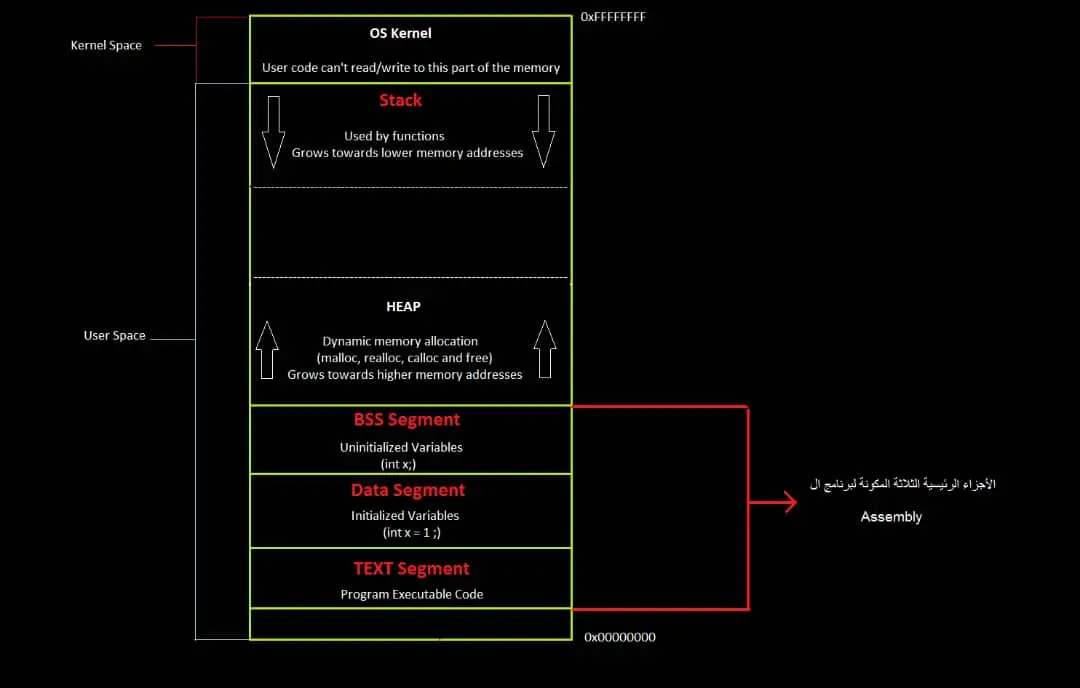 Figure (1): The memory split
As shown, memory divides into kernel space and user space. We touched on user space before in the virtual memory lesson of the C workshop; it hosts the programs the user runs.
So why this division?
This isolation exists to protect the operating system from anything executed by the user. Imagine what would happen if users were given control over the OS code living inside the kernel; the results would be catastrophic, and the OS would crash over and over again.
System Calls
Okay — what happens when a program running in user space needs to communicate with kernel space and request tasks from it?
That happens through something called System Calls: the interface — the junction point — between user space and kernel space. There is simply no way for anything inside user space to communicate with kernel space except through system calls:
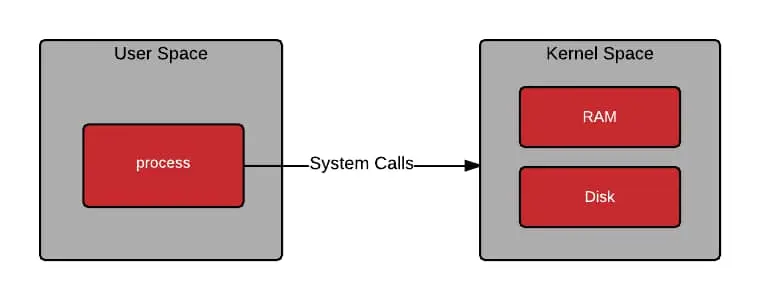 Figure (2): The request path from user to kernel
An Illustrative Example
When we write C code that prints Hello World:
printf("Hello World");
What happens at runtime?
When this program runs, it is loaded into memory in user space. But the program includes a printing operation, which is the responsibility of the operating system — more precisely, the kernel. The program then uses a syscall (on Linux) to ask the kernel to perform the printing; the kernel executes the task, returns to the program back in user space, and reports the result.
You might ask yourself: does all of this really happen just because I used printf? The answer is yes — what we described above is exactly what happens internally. When you use printf, its syscall gets invoked — called write() — and that is what actually performs the printing.
What About Windows?
On Windows we have the Windows API instead of raw system calls; that is the interface we use when we want the operating system to perform one of its responsibilities — printing in the previous example, for instance.
Summary
The operating system’s duties are many, and using any of them requires going through syscalls on Linux or the Windows API on Windows.
Here is a table showing some of the most important Linux system calls alongside their Windows API counterparts:
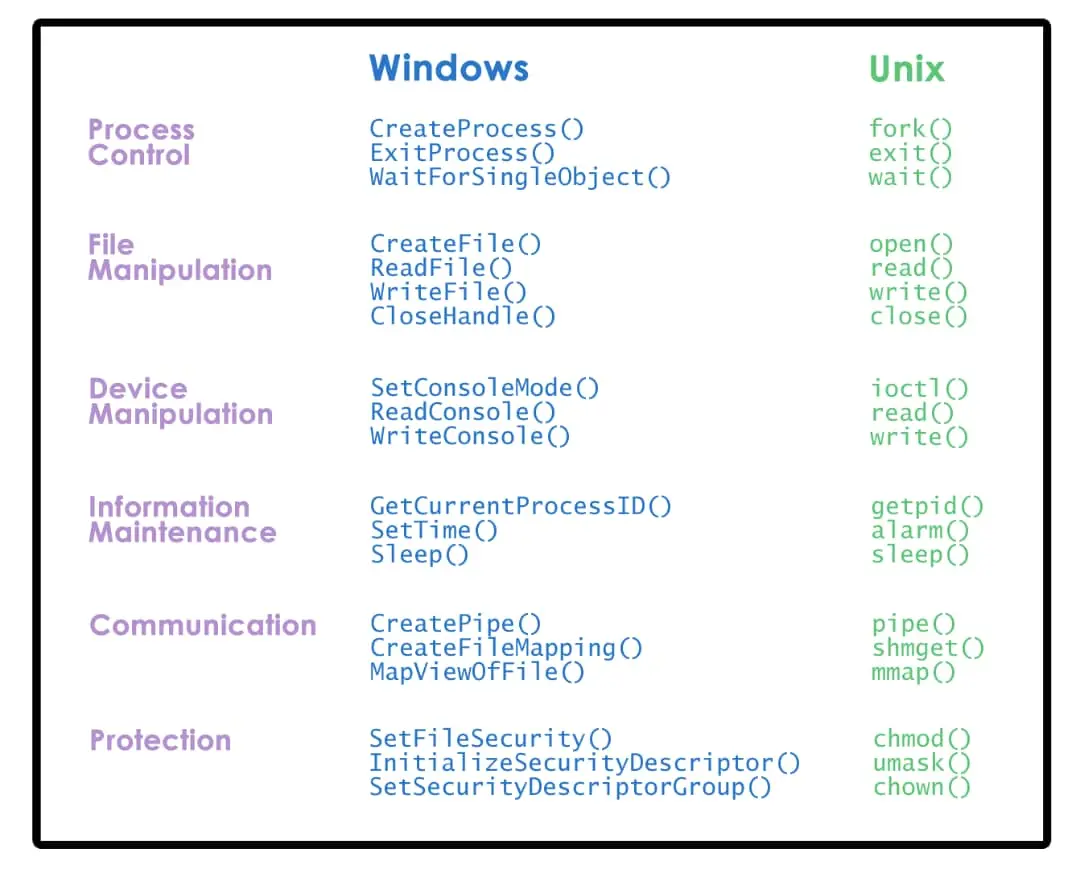 Figure (3): Linux system calls compared to Windows APIs
Remember us in your prayers.