بسم الله
We have reached the end of the series, and this is the final article. I ask God Almighty to write reward for me and for you, to benefit us from what He taught us and teach us what benefits us — He is the Guardian of that, the All-Capable.
Having covered the three main components — how are these components interconnected so they can exchange data? Through what is called interconnection structures.
Interconnection Structures
In computer systems, interconnection structures rely on different ways of linking the computing units — processor, memory, and I/O devices — together.
Let us discuss the two most famous structures:
Bus Interconnection
The bus is a means of transferring data between computer components over shared lines:
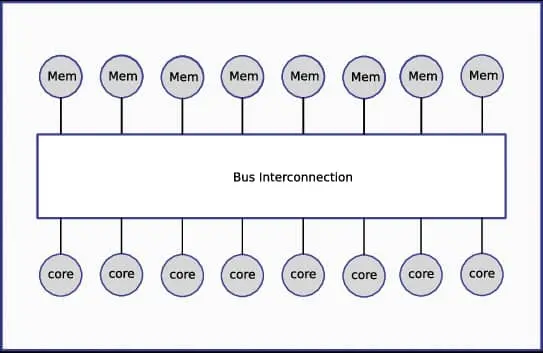 Figure (1): Components connected through a shared bus
A bus typically includes data lines (Data Bus), address lines (Address Bus), and control lines (Control Bus).
How does a transfer happen? The processor places the required memory address on the address lines; the control lines are then used to specify a read or write operation; finally the data moves across the data lines. The width of these lines is 32 or 64 bits.
The bus approach stands out for its simplicity and low cost, since all units connect through one shared path. Yet it has noticeable drawbacks:
- More than one device cannot send data at once, which requires an arbitration mechanism — and this raises waiting time as devices multiply.
- A fault in the bus itself or in any device that breaks it can bring down the entire system.
Hence the need arose for alternatives such as point-to-point interconnect networks.
Point-to-Point Interconnect
In point-to-point interconnects, every pair of units is connected by their own private link, with no shared medium for everyone:
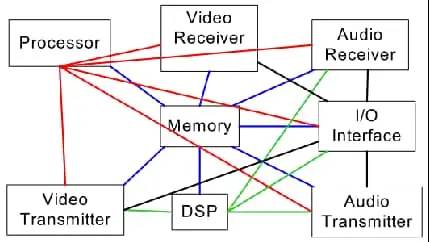 Figure (2): Each pair of units has an independent link
This model provides full-duplex bidirectional communication and maximum bandwidth per link. Most importantly, the interfaces need no complex arbitration mechanism like the bus’s; each link owns its own flow-control protocol, so there is no waiting time here.
Point-to-point connections take various forms in practice: some link several processors in multi-core systems like Intel QPI; others connect the processor to bridges or switches like PCIe.
What Is PCIe?
PCI Express is a modern standard for expanding computers at high speed, resembling an internal point-to-point link. Its goal is replacing old buses like PCI with a separate point-to-point link per device. In PCIe each link consists of lanes, and each lane carries bits serially in both directions at once (full-duplex). An ×16 link — the kind a graphics card may use — delivers massive throughput in the tens of gigabytes per second, far surpassing the legacy 32-bit PCI bus.
Comparing PCIe and PCI
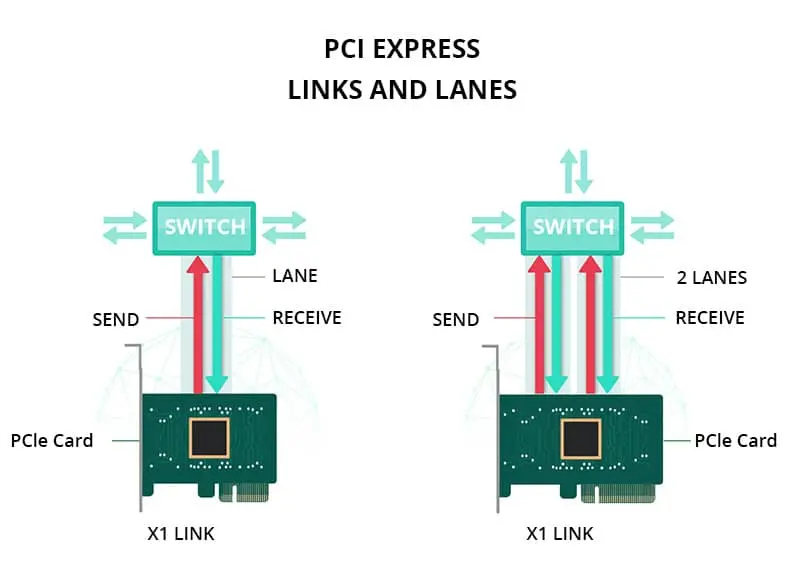 Figure (3): The difference in send/receive structure
Look at the comparison image: PCI is on the left — a single unit handling both send and receive over the shared path. On the right is PCI Express — two separate units: one for Send and one for Receive.
I honestly do not know whether this content provided the benefit intended of it, but I hope God granted me success throughout this series. God willing, in the coming days I will continue the C workshop and start an Operating System series. May God grant guidance and success. Greetings.
Remember me in your silent prayers.