بسم الله
The scarcity and weakness of Arabic resources covering these topics was one of the main reasons behind writing this series — the goal is to close that gap, and I ask God to make this work sincerely for His sake.
God willing, these articles will be the solid foundation you can build upon. We will approach every topic hands-on: writing code in C, then looking at its footprint in Assembly. On with it.
Note: we are pausing new lessons for the C workshop for a while — the upcoming topics there require a solid grasp of memory and how it works, which is exactly where this architecture series comes in.
Organization vs Architecture
Computer organization and architecture are two concepts that complement each other in designing a computer system.
• Computer Architecture: Refers to the functional and logical design of a computer system — choosing the Instruction Set, the functions of the processing unit, and so on. In other words: what the computer is able to do.
• Computer Organization: Concerned with the physical implementation of that structure and how the hardware is wired — in other words, how the computer does it, through the connections between the CPU, memory, and I/O.
For example:
Architecture dictates that an x86 processor uses the add instruction in a particular form, while ARM uses the same instruction in a different form. Organization, on the other hand, concerns how the processor actually executes that instruction internally (the presence of pipelining, or the cache size) — details invisible to the programmer, yet they directly affect execution performance.
So why is understanding architecture and organization essential? Understanding the architecture helps you translate binary instructions into readable commands, while understanding the organization helps you grasp how the processor actually interacts with memory and devices.
For example:
You may notice a Machine Code instruction placing a value into a register; understanding the organization lets you know which register — eax, ebx, etc. — that instruction uses, and why.
Example
Consider this simple C function:
int sum(int a, int b) {
    return a + b;
}
On x86 (with the cdecl calling convention), it might compile to:
sum:
    mov  eax, [esp+4]   ; load the first argument a into EAX
    add  eax, [esp+8]   ; add the second argument b to EAX
    ret                 ; return; the result is already in EAX
Note that the calling convention requires returning the function’s value in EAX itself — there is no need to write it to memory before returning.
Whereas on ARM:
sum:
    ADD  R0, R0, R1     ; add the contents of R0 and R1, result in R0
    BX   LR             ; return from the function
Here R0 typically carries the function’s first argument and its return value, per the ARM calling convention.
This difference in instruction format reflects a difference in architecture: the architecture defines the shape of these instructions (add, mov, …), while the organization defines how they are executed internally in hardware.
Basic Computer Functions
Every computer has four indispensable functions: Input, Processing, Output, and Storage.
• Input: Data arrives at the computer from the outside. Example: the user enters a number via the keyboard, or an image through a scanner.
• Processing: The CPU performs arithmetic and logic operations on the input data to produce the required results. Example: multiplying or adding two numbers.
• Output: After processing, the results are displayed or sent to the outside. Example: the computer may send the results to a display or print them on a printer.
• Storage: Saving data and information — including temporary storage in RAM during execution, or permanent storage on HDDs or SSD units. Storing variables and their values in memory also counts as storage.
Example
The following C code illustrates the lifecycle of data:
int x = 10;              // Storage: saving the value 10 in variable x
int y = 20;              // Storage: saving the value 20 in variable y
int sum = x + y;         // Processing: adding x and y
printf("%d\n", sum);     // Output: printing the sum
Compiled for x86:
mov  eax, [x]     ; fetch the value of x from memory into EAX
add  eax, [y]     ; add the value of y (from memory) to EAX
mov  [sum], eax   ; store the sum from EAX into the variable sum
CPU, Memory and I/O Overview
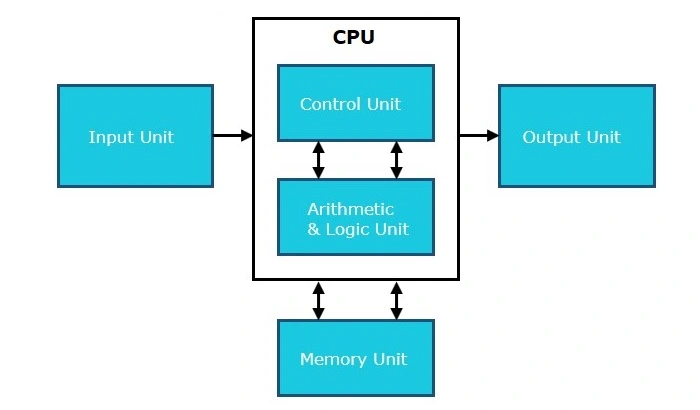 Figure (1): The main components of a computer system
Central Processing Unit (CPU)
The brain of the computer, responsible for executing arithmetic and logic operations and controlling program flow. It contains:
- An Arithmetic Logic Unit (ALU) that executes instructions.
- A Control Unit that coordinates instruction execution.
- A set of Registers for temporarily holding data.
In other words, it is the primary workhorse: it fetches instructions from memory and executes them one by one.
Example: the instruction add eax, 1 means the ALU will add one to the eax register inside the CPU.
Memory
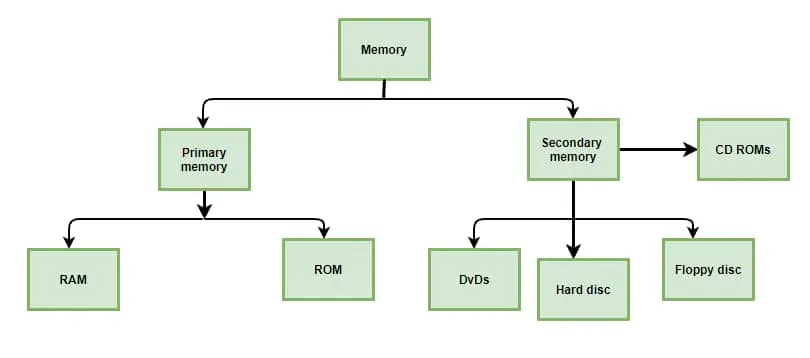 Figure (2): Memory divides into primary and secondary
It is where data and instructions are kept, and it splits into two categories:
• Primary Memory: Includes Random Access Memory (RAM), which holds temporary data while the machine runs, and Read-Only Memory (ROM), which carries the boot programs.
• Secondary Memory: Such as HDD drives and SSD units, used for long-term data storage.
During processing, data and instructions move from primary memory to the CPU.
Example: mov eax, [address] — when executed, the processor fetches the data at the given memory address into the eax register.
I/O Devices
They are the intermediary connecting to the computer, feeding it data and receiving its results:
- Input devices such as the keyboard and mouse.
- Output devices such as the display and printer.
The I/O interface mediates data transfer between the CPU’s speed and the speeds of external devices, and monitors errors along the way.
Example
C code:
int a = 5;      // define variable a in memory
int b = 3;      // define variable b in memory
int c = a + b;  // move a and b to the CPU, add them, store the result in c
Compiled for x86:
mov  eax, [a]    ; fetch the value of a from memory into EAX
add  eax, [b]    ; add the value of b (in memory) to EAX
mov  [c], eax    ; store the sum in the variable c
These commands show how the CPU interacts with memory, while I/O devices deal with the outside world — an essential part of understanding where and how data reaches the computer, and how it can be extracted from it.
The Instruction Cycle
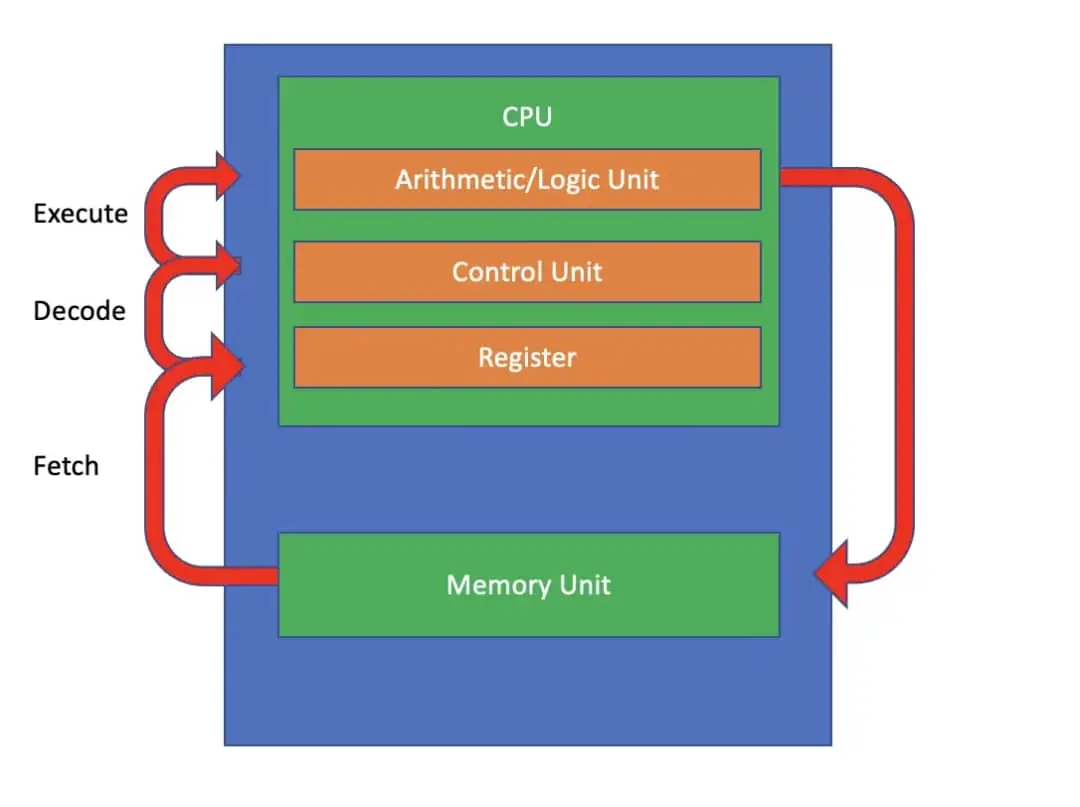 Figure (3): The fetch–decode–execute cycle
The instruction cycle — the fetch–decode–execute cycle — is the repeating process the CPU runs through to execute each instruction of a program. It consists of three fundamental stages:
1. Fetch: The processor uses the Program Counter (PC) to locate the next instruction in memory. It reads the binary instruction from that address and places it into the Instruction Register (IR), then increments PC to point to the following instruction.
2. Decode: Having fetched it, the processor interprets the instruction held in the IR: it determines the Opcode and the required Operands. If the instruction means “add the contents of two registers”, it identifies the operation type (addition) and the two registers involved.
3. Execute:
Finally, the processor carries out the required operation. That could be an arithmetic/logic operation in the ALU (such as addition or subtraction), moving data between registers and memory, changing the Program Counter for special cases (such as a jmp jump), or any other control action.
Example
int x = 5;
int y = 3;
int z = x + y;
Compiled:
mov  eax, 5       ; first instruction: move the immediate value 5 into EAX
mov  ebx, 3       ; second instruction: move the immediate value 3 into EBX
add  eax, ebx     ; third instruction: add EBX to EAX
mov  [z], eax     ; store the result into z
The key insight here is that every single instruction passes through all three stages — it is not the case that each instruction takes one stage. Take add eax, ebx as an example:
- Fetch: the processor reads the instruction’s bytes from the address PC points to and places them into IR.
- Decode: the decoder identifies the opcode as ADD and the operands as the registers EAX and EBX.
- Execute: the ALU performs the addition, the result lands in EAX, and the flags update.
The processor then moves on to the next instruction and repeats the same cycle, all the way to the end of the program. Throughout this cycle, different parts of the system (memory, registers, the arithmetic unit) interact to make execution happen.
With that, we have laid the foundation stone of the series — see you in the next lesson, God willing.
Remember me in your prayers.